
Why a CRM Platform Is Essential for Scalable Growth

A CRM platform is a shared system for storing customer and prospect data, tracking every interaction, and helping sales, marketing, and service teams work from the same record. Instead of losing leads, emails, support issues, and deal details across spreadsheets and disconnected apps, your team gets one reliable view of each relationship.
The right platform can help you:
- Track leads, deals, tasks, and customer history in one place
- Automate routine follow-ups, routing, and reporting
- Connect marketing activity to sales pipeline results
- Give service teams the context needed to resolve issues faster
- Use AI to prioritize opportunities and suggest next steps
This matters because growth becomes harder when systems do not connect. The average organization uses nearly 900 applications, yet only 29% are integrated. CRM software creates a practical foundation for cleaner data, better handoffs, and more consistent customer experiences. With the CRM market projected to reach $96.39 billion by 2027, choosing the right system is no longer just a sales decision; it is an operational strategy.
I am Doru Angelo, Founder and CEO of Onyx Elite LLC, with more than a decade of experience helping organizations improve operations, market positioning, and scalable systems. In this guide, I will help you assess each CRM platform through the lens that matters most: whether it supports clear processes, stronger customer relationships, and sustainable growth.
Core Architecture: How a Modern CRM Platform Centralizes Business Intelligence
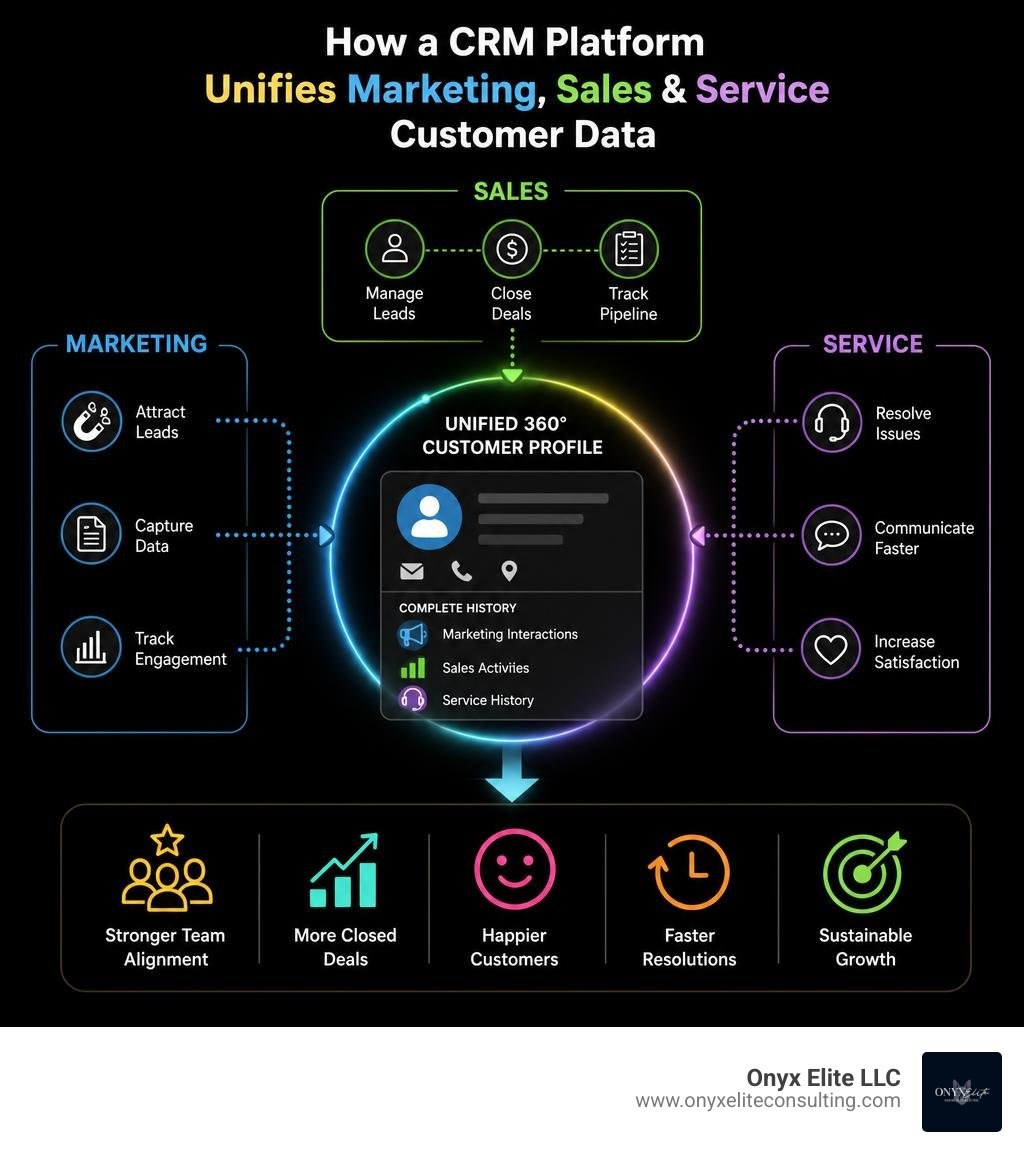
At its core, modern customer relationship management architecture consolidates siloed customer data into an accessible, real-time single source of truth. When marketing logs a form conversion, sales schedules a product demonstration, or customer support resolves an inquiry, every data point attaches to a unified 360-degree customer profile.
This centralization eliminates the operational drag of cross-departmental silos. Instead of sales reps guessing which campaign brought in a lead, or support agents asking customers to repeat their purchase history, everyone accesses a dynamic profile tracking the entire lifecycle. For service-oriented businesses managing complex client engagements, implementing a robust CRM for Service Businesses ensures team members collaborate seamlessly without dropping critical client context.
The Evolution from Static Databases to Agentic Systems
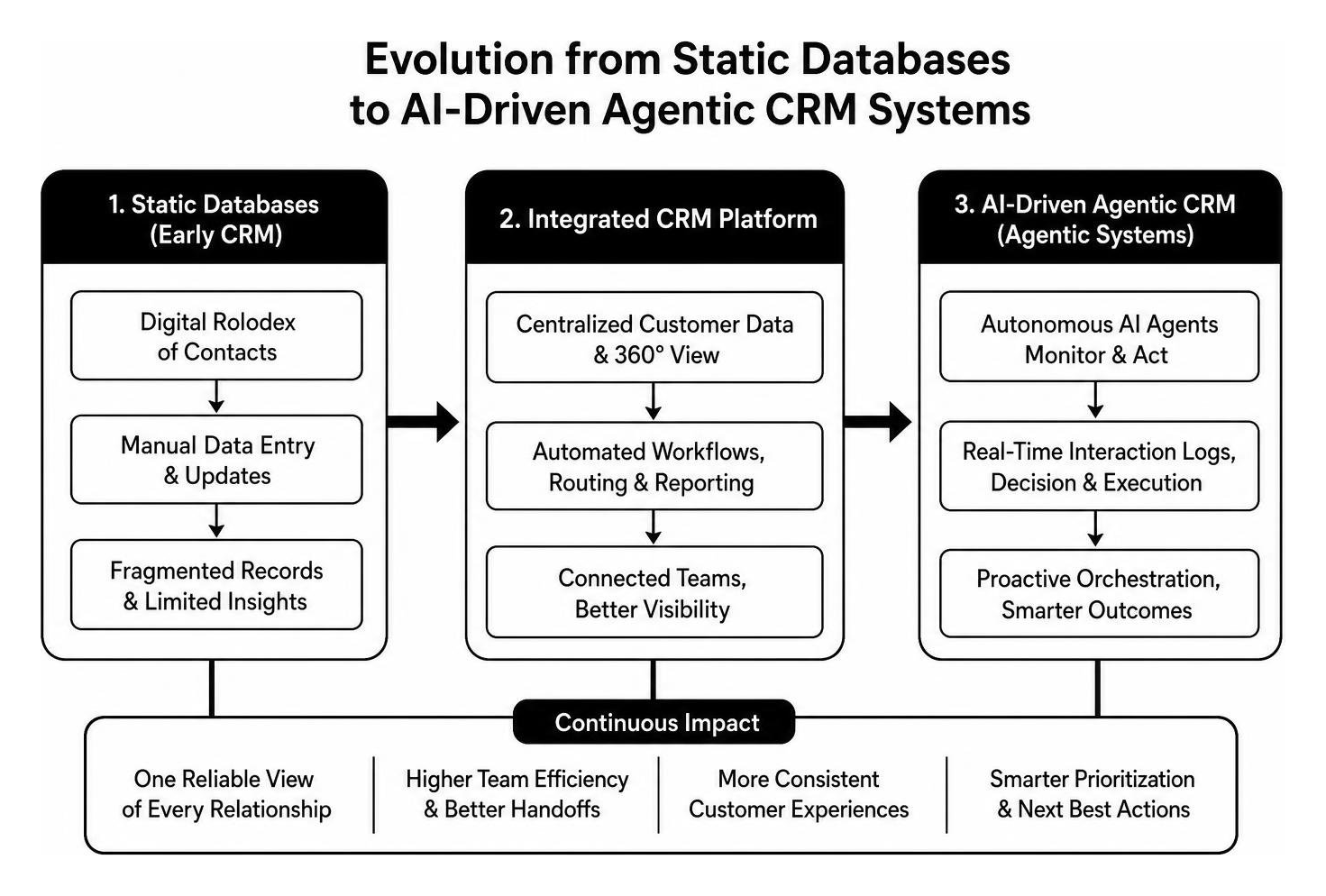
Customer relationship technology has transformed significantly over recent years. Early systems operated merely as digital Rolodexes—static databases requiring manual data entry to track contact details and transactional notes.
Today, the industry has embraced agentic architecture. Modern systems deploy autonomous AI agents capable of monitoring data streams, generating real-time interaction logs, triggering workflows, and executing complex decisions without human intervention. Solutions like Salesforce CRM: Try The World’s #1 Agentic CRM | Salesforce illustrate how autonomous agentic engines can research prospects, generate contextual talking points, and draft tailored communications. Instead of workers spending hours typing updates into databases, the platform proactively orchestrates work in real time.
Operational, Analytical, and Collaborative CRM Platform Models
To select the right tool, organizations must understand the three foundational operational models of customer software. While many modern suites blend these capabilities, platforms typically prioritize one primary model:
| CRM Model | Core Purpose | Key Functionality | Primary Department Beneficiaries |
|---|---|---|---|
| Operational | Process Automation | Lead capture, sales pipeline automation, service ticketing, appointment scheduling | Sales, Frontline Customer Support, Marketing |
| Analytical | Business Intelligence & Data Mining | Customer lifecycle analytics, churn prediction, revenue attribution, segmentation | Executive Leadership, Business Analysts, RevOps |
| Collaborative | Inter-Departmental Alignment | Shared inboxes, cross-functional communication logs, partner data exchange | Distributed Account Teams, Service, External Vendors |
Operational systems automate front-office tasks. Analytical models interpret large volumes of behavioral data to reveal trends, while collaborative systems ensure multi-tier service and account management teams share up-to-the-minute client history across every touchpoint.
Essential Functional Capabilities Across Sales, Marketing, and Service

The best tools bring order to day-to-day operations by providing practical, robust features across all customer-facing touchpoints. For growing teams seeking a Simple CRM Small Business setup, functional clarity ensures rapid user adoption without unnecessary interface bloat.
Lead Nurturing, Pipeline Management, and Revenue Forecasting
Managing deals through clear pipeline stages provides sales leaders with unmatched revenue predictability. By standardizing deal stages—from discovery and proposal to legal review and closed-won—sales teams can identify bottlenecks, evaluate deal velocity, and prioritize high-value prospects.
Advanced pipeline management tools leverage automated scoring, assessing prospective buyers by engagement levels, demographic fit, and intent data. Deploying these structured workflows helps organizations capture real performance gains: enterprise data reveals that companies adopting mature sales platforms achieve up to an 87% win rate, +30% sales revenue, and +85% faster deal closure. Establishing structured pipeline systems forms a foundational pillar among the 5 Internal Systems That Drive Scalable Growth for Service-Based Businesses.
Omnichannel Customer Support and Service Ticketing
Customer support capabilities have become integral to retention and expansion. With 82% of service professionals confirming that customer expectations are higher than ever, fragmented email threads and forgotten tickets directly harm the bottom line.
A modern platform integrates shared team inboxes, voice logging, SMS, and web chat into a single ticket queue. Service-level agreement (SLA) timers notify managers of pending inquiries, and automated routing directs complex issues to specialized technicians. Unifying service history with sales records allows companies to resolve issues up to 32% faster on the first interaction, helping teams Enhance Operational Efficiency and elevate customer lifetime value.
Integrating CRM with Marketing Automation and Enterprise Systems
Operating disparate tools produces massive information bottlenecks. When marketing automation runs independently from sales systems, leads slip through the cracks, reporting breaks down, and customer messaging becomes disjointed. Establishing an end-to-end Marketing Automation Integration aligns marketing lead capture with downstream sales actions.
Bridging the Gap Between Inbound Marketing and Sales Pipeline
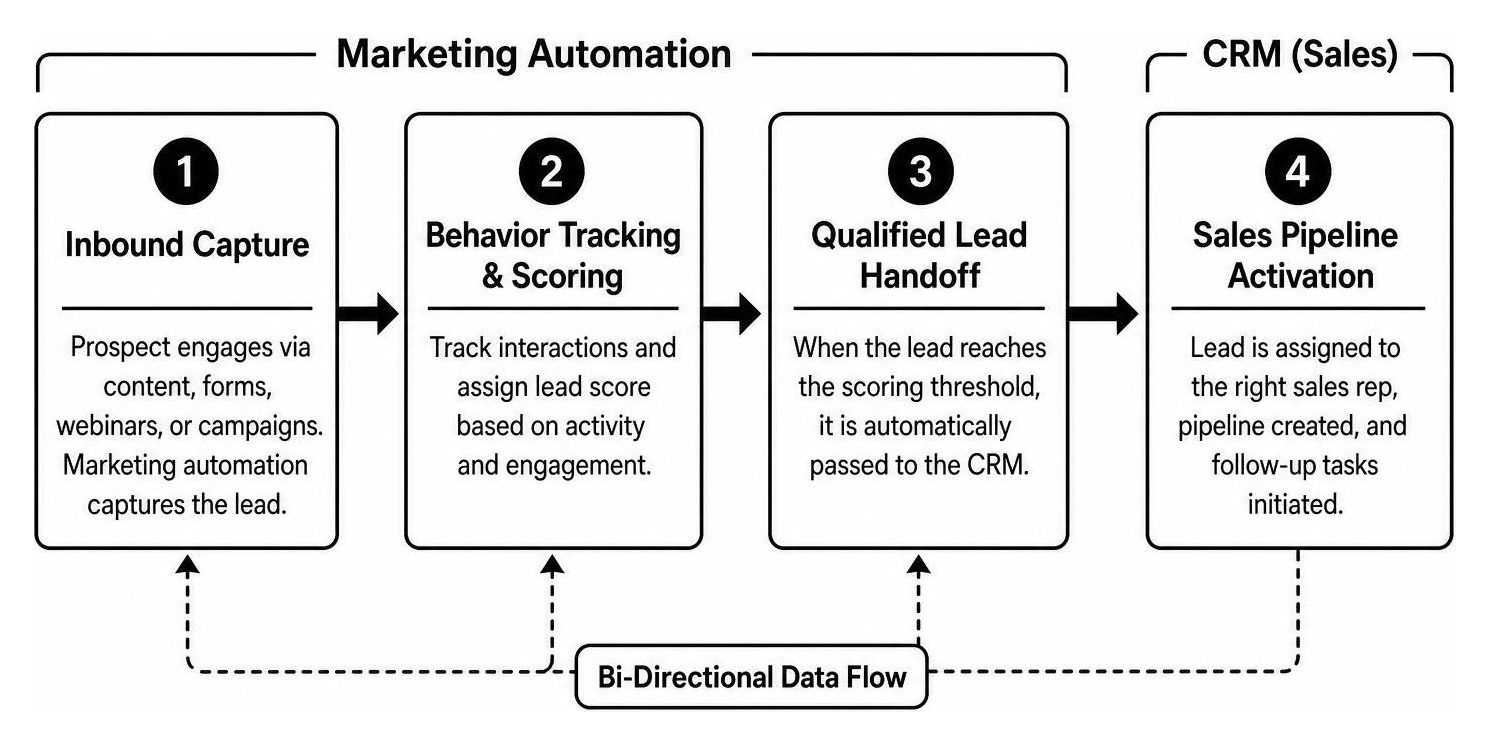
The transition from top-of-funnel lead generation to sales engagement requires continuous, bi-directional data flow. When an inbound prospect downloads an educational asset or registers for a briefing, marketing automation software captures behavioral triggers and scores the lead based on activity.
Once a prospect reaches a qualified scoring threshold, the integration passes the record directly to the sales pipeline, assigning tasks to the appropriate representative. Step-by-step frameworks outlined in our CRM Marketing Automation Integration Guide and our comprehensive Marketing Automation Workflow Guide 2026 illustrate how automated handoffs eliminate pipeline friction and prevent lead drop-off.
Overcoming Application Fragmentation Through Unified Data Sync
With organizations juggling hundreds of standalone SaaS products, native two-way data sync prevents error-prone double entry. Whether syncing accounting records from financial ledgers, transactional logs from payment processors, or meeting logs from calendar suites, real-time API connectors maintain clean records across systems.
Platforms like Sales CRM & Pipeline Management Software | Pipedrive showcase how visual sales systems connect with extensive application marketplaces to centralize communications and documentation. Embedding native data synchronization ensures consistent business records, which forms the cornerstone of broader Automation and Process Improvement initiatives.
Strategic Selection Framework: Tiers, Scaling, and AI Capabilities

Selecting an optimal platform requires balancing budget constraints against organizational growth plans. Calculating the total cost of ownership (TCO) means assessing software licenses, integration costs, add-on features, and data storage limits over time. Prioritizing structured Business Process Improvement ensures software choices match actual operational needs rather than perceived feature checklists.
Evaluating Free vs. Enterprise CRM Platform Tiers
Software tiers cater to distinct business stages. Understanding their boundaries prevents unexpected expenses as your database expands:
- Free / Freemium Tiers: Suitable for solo operators, micro-businesses, and early-stage startups. These plans usually offer contact storage for up to 1,000 records, standard pipeline tracking, basic web forms, and limited integrations without upfront fees.
- Starter Tiers ($15–$30/user/month): Designed for growing teams requiring custom pipeline stages, automated email tracking, shared team inboxes, and basic reporting dashboards without complex customization.
- Professional Tiers ($50–$100/user/month): Built for established mid-market businesses. Includes advanced workflow automation, custom reporting, multi-currency support, granular role-based permissions, and bi-directional API integrations.
- Enterprise Tiers ($150–$300+/user/month): Tailored for large, complex operations. Provides dedicated infrastructure, enterprise-grade governance, sandboxes for development, predictive machine learning, and virtually unlimited custom objects.
Agentic AI, Autonomous Workflows, and Customization Requirements
When evaluating advanced tiers, evaluate how deeply artificial intelligence integrates into everyday workflows. Modern platforms do not merely offer predictive text; they feature conversational interfaces, autonomous research assistants, and low-code workflow designers that execute complex business logic.
Organizations planning custom software architectures or requiring technical migration guidance often turn to local strategic advisors. Engaging with experts in Technology Consulting Connecticut helps executive teams evaluate composable architectures, API limits, and natural language AI configurations to build an agile tech stack.
Overcoming Common Implementation Challenges and Driving Adoption
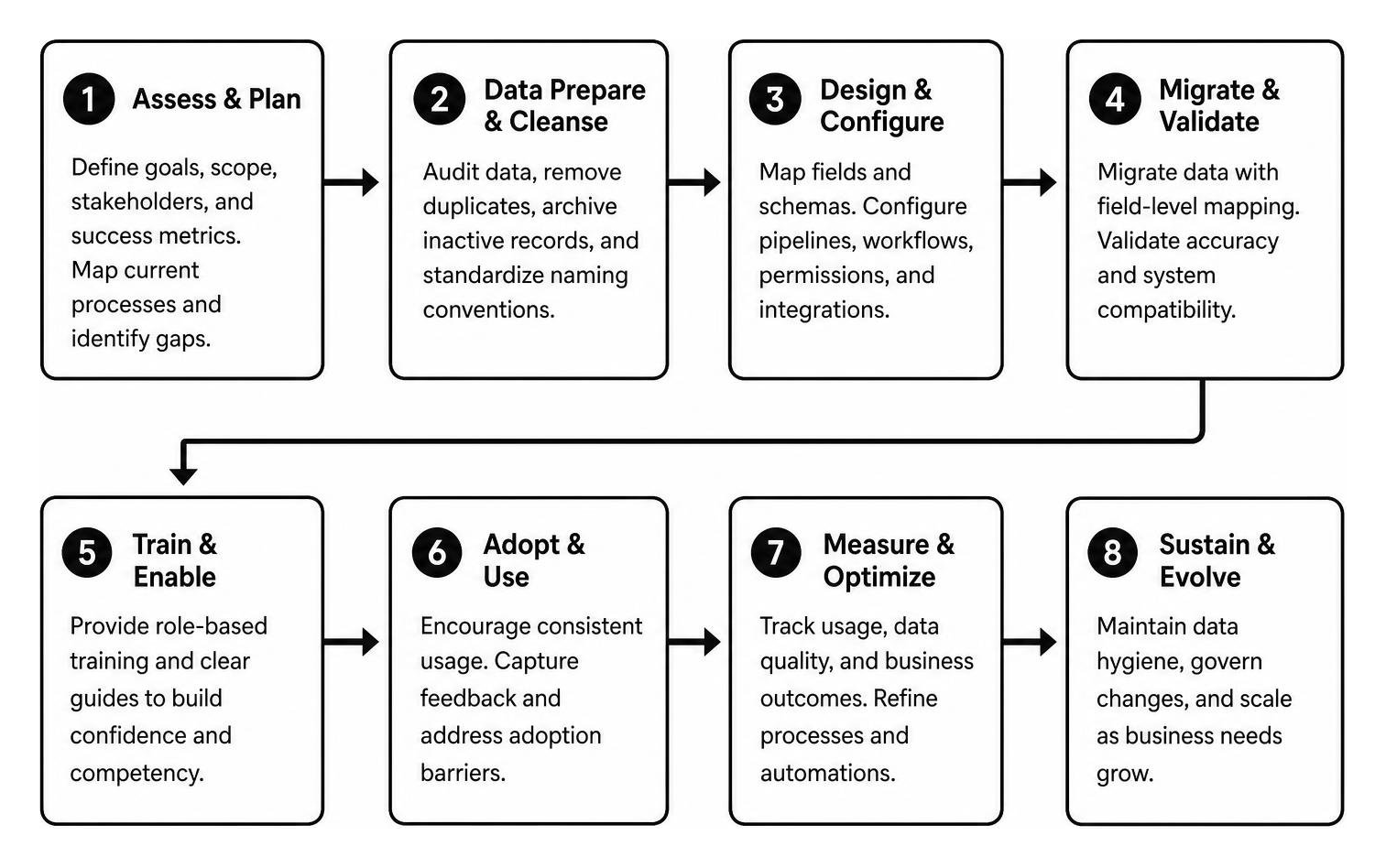
Even feature-rich software fails if team members resist using it or if bad data corrupts the system. Successfully executing an Operational Excellence Implementation Guide requires treating CRM deployment as an organizational transformation rather than a simple IT setup.
Data Migration Hygiene and System Compatibility
Migrating dirty data into a brand-new system creates immediate operational headaches. Before importing historical files, teams must run comprehensive data audits to merge duplicates, archive inactive records, and standardize naming conventions across accounts.
Mapping database schemas requires rigorous field-level matching to ensure legacy records populate corresponding custom fields accurately. Establishing clean data hygiene protocols prevents reporting errors and guarantees that automated sales workflows trigger reliably from day one.
Change Management, Team Onboarding, and Governance Controls
User adoption represents the single largest hurdle during deployment. If sales representatives feel that updating pipeline records requires unnecessary administrative overhead, they revert to private spreadsheets and offline notes.
To build sustained buy-in:
- Involve End-Users Early: Gather feedback from sales reps and support agents during platform selection to address workflow pain points.
- Implement Role-Based Access Controls (RBAC): Maintain data security by applying least-privilege access rules so team members only see relevant records.
- Establish AI Guardrails: Configure clear autonomy thresholds, audit logging, and manual approval triggers for AI-generated outreach or high-value customer actions.
- Provide Hands-on Training: Deliver role-specific onboarding workflows rather than generic system demonstrations.
When rolling out enterprise systems across complex teams, partnering with professional Business Consulting Services ensures structured change management, smooth technology adoption, and measurable operational ROI.
Frequently Asked Questions About Customer Relationship Management
What is the primary difference between a CRM and marketing automation software?
Marketing automation software focuses on top-of-funnel lead generation, managing email nurture sequences, landing pages, and campaign tracking across anonymous visitors and new prospects. A CRM system manages bottom-of-funnel sales pipelines, active opportunities, post-sale account management, and customer support. When connected, marketing automation passes qualified leads directly to the CRM for direct sales follow-up.
How does artificial intelligence change daily CRM operations in 2026?
Modern artificial intelligence transforms software from passive data storage into proactive digital assistants. AI agents automatically draft personalized email responses, score inbound leads based on intent signals, transcribe customer discovery calls, summarize ticket histories, and predict client churn risk. These tools automate routine administrative tasks, allowing teams to focus on high-value client relationships.
What key factors determine whether a business needs a starter or enterprise tier?
The decision between starter and enterprise tiers depends on database scale, operational complexity, and governance requirements. Companies with small teams and standardized sales pipelines thrive on starter plans. Organizations requiring custom object architecture, complex multi-tier approval chains, custom API rate limits, regulatory compliance controls, or dedicated developer sandboxes require the governance and capacity of enterprise tiers.
Conclusion
Selecting and deploying the right customer platform is one of the most critical investments a business can make. By centralizing disparate customer interactions, automating administrative workflows, and leveraging agentic AI intelligence, organizations build the operational resilience necessary to scale customer acquisition and retention predictably.
At Onyx Elite LLC, we partner with executive leaders in Connecticut and across the nation to build scalable internal systems, streamline complex operations, and design high-impact growth frameworks. To turn your customer technology into a predictable engine for sustainable expansion, explore our comprehensive strategic business consulting services today.