

Marketing Automation for Professional Services: Streamline Your Pipeline

Understanding Marketing Automation vs. CRM in Professional Services
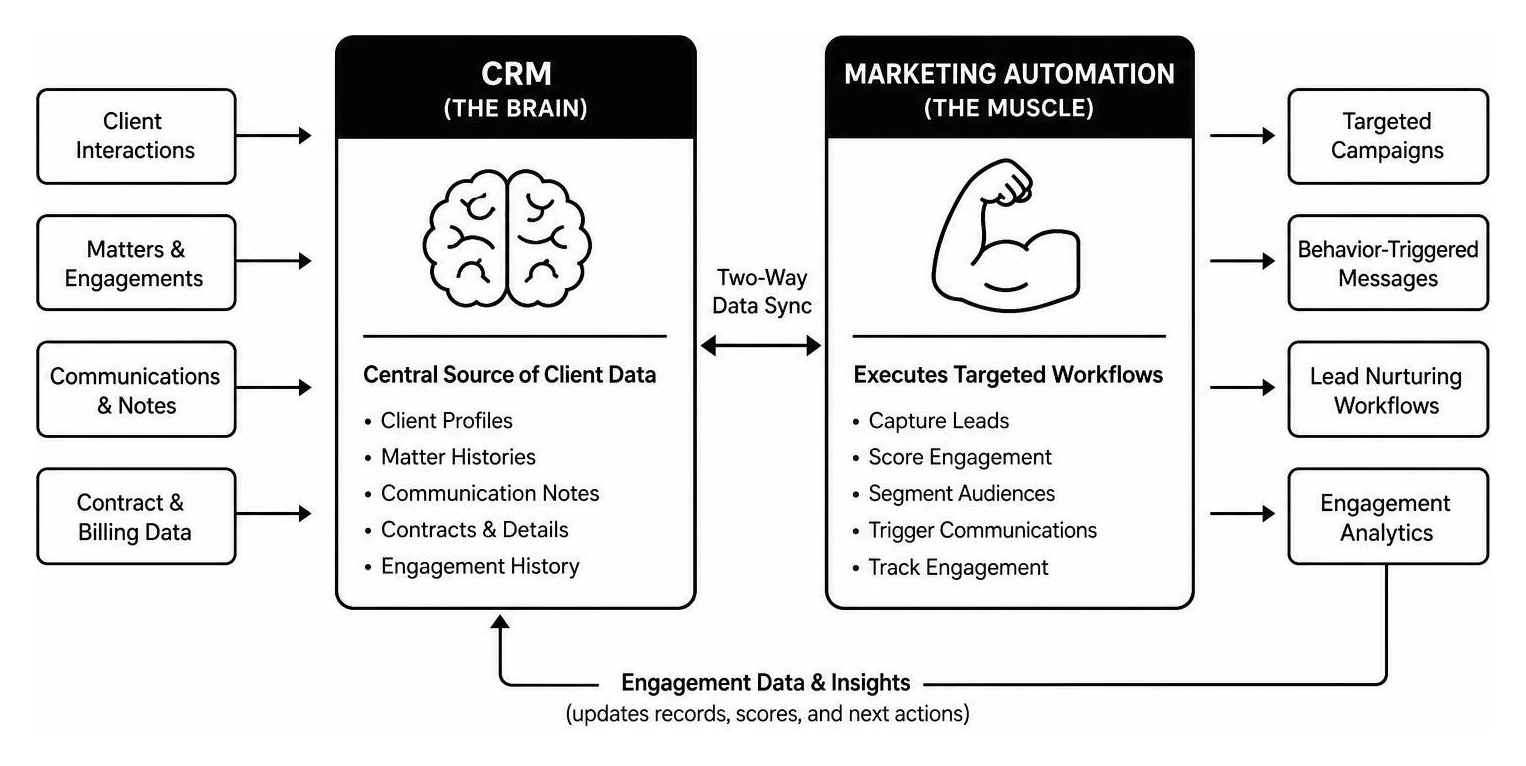
To build a high-performing digital engine, firm leaders must understand how client management technologies work together. Software tools serve different purposes, and confusing their functions creates operational gaps.
A Customer Relationship Management (CRM) platform serves as the central brain of record. It stores client histories, active matters, contract details, and communication notes. In contrast, marketing automation is the muscle. It executes targeted campaigns, sends behavior-triggered communications, captures online leads, and tracks prospect engagement across digital touchpoints.
Connecting these two systems allows data to flow seamlessly between marketing campaigns and sales channels. When a prospect downloads an executive whitepaper, your automation platform records that activity and calculates an engagement score. Once that score hits a defined threshold, the platform creates an immediate task in your CRM for a managing partner or advisor.
Using disconnected tools causes misaligned messaging. There are few worse user experiences than a long-term client receiving a generic introductory email blast, or an active sales prospect getting an automated newsletter pitch for a service they already declined. Combining these systems gives your firm a complete view of client interactions. For a deeper look at optimizing your software stack, explore our CRM Marketing Automation Integration Guide.

Dynamic Lead Scoring and Trust-Building Workflows
Unlike impulse retail purchases, high-value B2B and professional services purchases involve long consultative sales cycles. Buyers research options quietly before ever reaching out. Marketing automation for professional services helps firms measure buyer interest using dynamic lead scoring.
Lead scoring measures two main dimensions:
- Firmographic Fit: Does the prospect match your target audience based on industry, company size, revenue, or geographical location?
- Behavioral Intent: Is the prospect actively engaging with your firm's educational resources?
Behavioral triggers adjust scores based on specific buyer actions:
- Downloading a detailed industry benchmark report (+15 points)
- Visiting your practice group pricing or consultation page (+20 points)
- Opening three educational email newsletters in a month (+10 points)
- Unsubscribing from a topic list (-25 points)
When scores cross your qualification threshold, automated triggers alert your business development team to follow up personally. This consultative approach builds genuine trust, delivering helpful, expert guidance long before pitching a contract.
Why Marketing Automation for Professional Services Is Essential for Scalable Growth
Service firms face a common growth operational ceiling. Because revenue is tied directly to practitioner hours, administrative drag limits overall capacity. Senior partners often spend critical hours manually emailing meeting links, following up on proposal drafts, and logging meeting notes into fragmented spreadsheets.
Adopting marketing automation for professional services eliminates repetitive manual work across your revenue operations. Automation simplifies routine administrative tasks, allowing firm leaders to focus on billable client strategy and business development. To build a stronger operational foundation, see our guide on 5 Internal Systems That Drive Scalable Growth for Service-Based Businesses.
| Engagement Task | Manual Process | Automated Workflow | Operational Impact |
|---|---|---|---|
| Lead Capture & Intake | Admin manually enters form submissions into spreadsheets and forwards emails. | Web forms automatically create CRM records, run lead scoring, and assign owner. | Instant response time; 0% administrative intake overhead. |
| Webinar Follow-Up | Marketing coordinator manually exports attendee lists and crafts individual follow-up emails. | Automated system segments attendees vs non-attendees and sends tailored recap emails within 2 hours. | 4x faster campaign deployment; immediate engagement while interest is peak. |
| Inactive Client Re-engagement | Fee earners rely on memory to reach out to former clients every few months. | System monitors time since last engagement and triggers tailored check-in reminders. | Predictable pipeline generation; zero lost cross-selling opportunities. |
Core Workflows in Marketing Automation for Professional Services
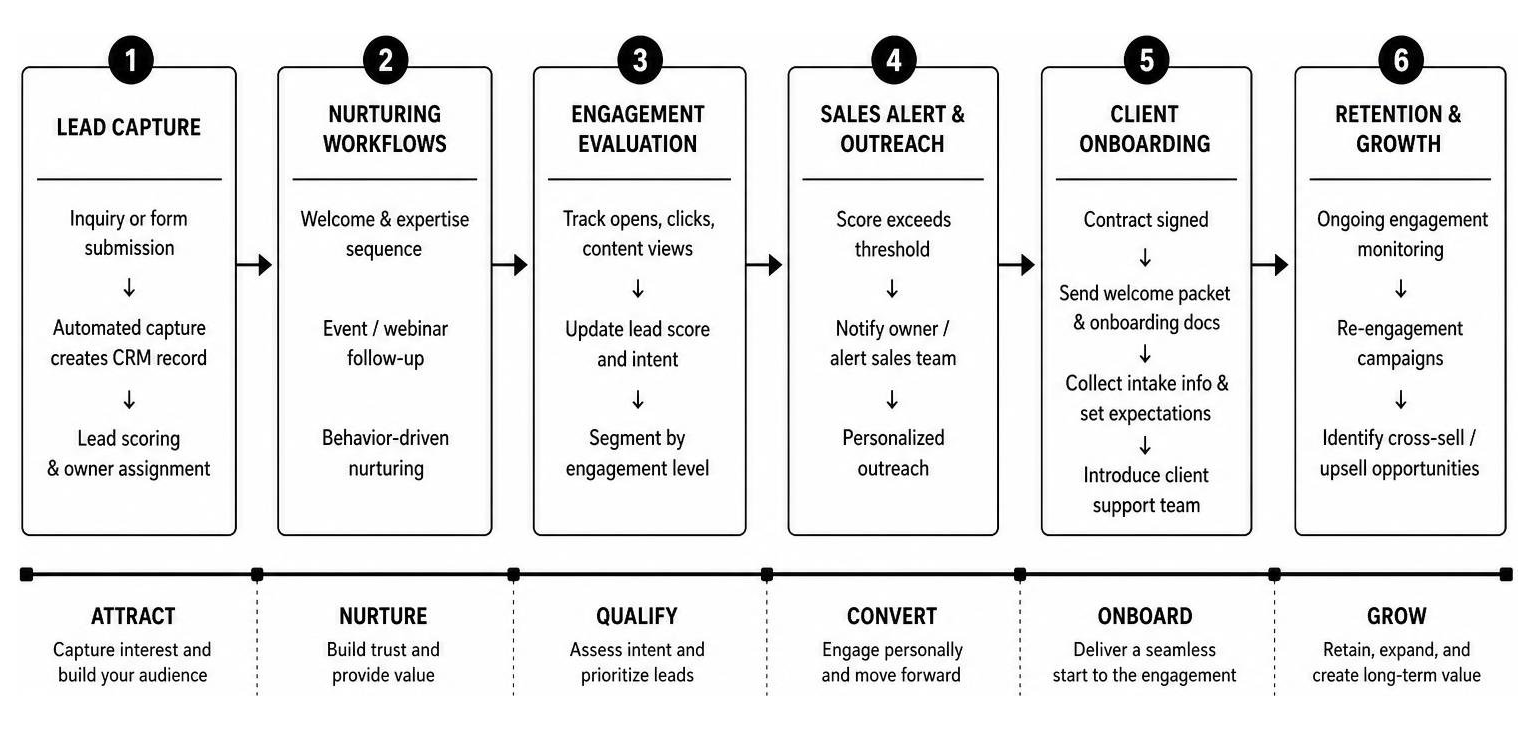
Implementing automated workflows ensures your firm maintains high-touch communication across every stage of the client lifecycle. Five primary workflows deliver high operational impact for professional service providers:
- The Welcome and Expertise Sequence: Triggers immediately after a prospective client subscribes to newsletter content or requests a resource. Over five to seven emails, this sequence introduces your core practice areas, highlights case studies, and establishes firm authority without aggressive selling.
- Event and Webinar Marketing Orchestration: Manages invitation sends, registration confirmations, calendar invites, pre-event reminder cadences, and post-event recap materials automatically.
- New Client Onboarding Journeys: Activates once a contract is signed. This workflow sends welcoming documentation, collects intake form details, sets project expectations, and introduces client support teams.
- Targeted Re-Engagement Campaigns: Automatically identifies inactive contacts who have not opened communications or engaged with your firm over the past six months, inviting them to reconfirm preferences or review new insights.
- Behavior-Driven Thought Leadership Nurturing: Delivers niche insights based on user actions, such as sending specialized tax guidance to users who read corporate restructuring articles.
To set up these sequences efficiently, review our comprehensive Marketing Automation Workflow Guide 2026.
Client Retention, Cross-Selling, and Upselling Strategies
Growing revenue isn't just about winning new clients; expanding existing accounts is often far more profitable. Yet, busy firm practitioners frequently miss cross-selling opportunities due to team silos.
Marketing automation helps break down internal silos by tracking real-time client engagement. If a corporate law client starts reading articles on your website about employment risk compliance, your system captures that intent signal. Rather than sending a generic newsletter, the platform alerts account managers to present an employment law consultation.
Automated check-ins can also be scheduled at key lifecycle milestones, such as 90 days after project completion or annually ahead of tax season. This systematic follow-up improves retention rates, reduces client churn, and unlocks expansion revenue. Explore dedicated strategy options in our guide to Lead Nurturing Automation Tools.
Selecting, Measuring, and Scaling Your MarTech Stack
Selecting software for your marketing technology stack requires evaluating your firm's specific workflows, security requirements, and technical capabilities. Avoid buying expensive enterprise systems with features your team won't use.

When evaluating software solutions, focus on these core criteria:
- Open Ecosystem and Connectors: Choose software that integrates smoothly via open APIs with your existing CRM, enterprise resource planning (ERP), practice management tools, and business intelligence suites.
- Ease of Use: Prioritize clean drag-and-drop campaign editors so your marketing managers can build workflows without needing software developers.
- Compliance and Security Capabilities: Ensure the platform supports robust encryption standards, single sign-on (SSO), role-based permissions, and global privacy standards.
- Support and Training: Look for vendors that offer comprehensive onboarding assistance, strategic guidance, and responsive customer service.
For a detailed review of modern platforms and architectures, refer to our Marketing Automation Services Guide 2026.
Calculating Marketing ROI and Revenue Attribution
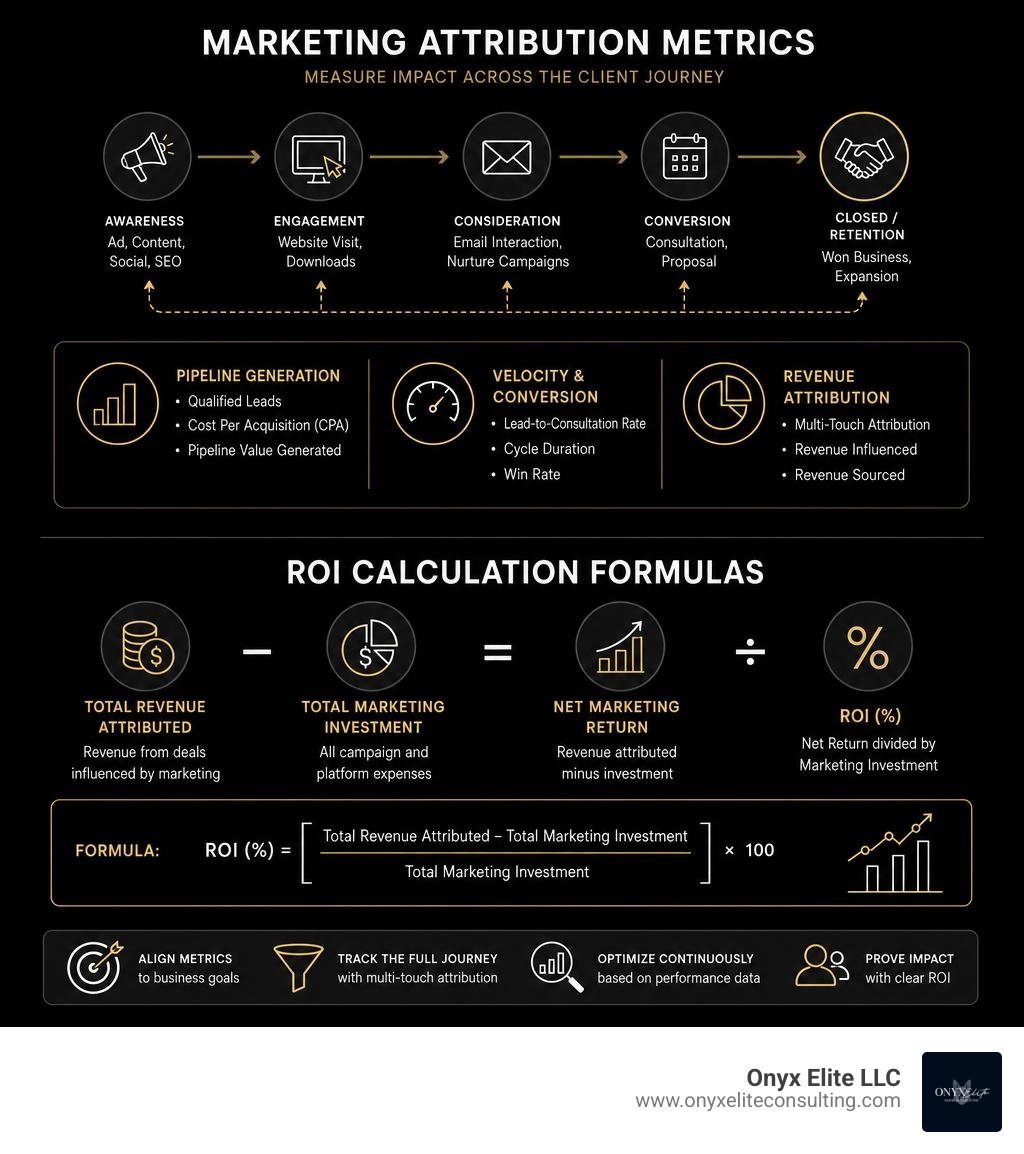
To prove campaign value to equity partners and executive boards, marketing teams must move past superficial vanity metrics like opens, impressions, and post likes. Senior leadership wants to see clear pipeline impact and financial returns.
Track performance across three primary attribution levels:
- Pipeline Generation Metrics: Total qualified leads created, cost per acquisition (CPA), and pipeline valuation generated by automated campaigns.
- Velocity and Conversion Rates: Lead-to-consultation conversion speed, cycle duration reductions, and contract win rates.
- Revenue Attribution: Multi-touch attribution mapping every digital interaction across the client journey, linking marketing spend directly to closed contracts.
Step-by-Step Implementation Framework
Rolling out an automation platform requires structured change management. Following a phased rollout plan minimizes operational disruptions and speeds up team adoption:
- Phase 1: Discovery & Strategy Alignment (Weeks 1–2) Define clear business goals, map buyer journeys, establish sales service-level agreements (SLAs), and assign technical project managers.
- Phase 2: Technical Setup & CRM Integration (Weeks 3–4) Connect system architectures, set up domain security protocols, configure tracking tags, and implement bidirectional CRM sync rules.
- Phase 3: Data Cleaning & Segmentation (Weeks 5–6) Audit existing database contacts, remove duplicate records, update opt-in permissions, and segment contacts by industry, buyer role, and client status.
- Phase 4: Content Mapping & Workflow Architecture (Weeks 7–8) Draft dynamic message templates, set up lead scoring logic, create onboarding sequences, and build behavior-driven campaign flows.
- Phase 5: Beta Launch, Testing & Upskilling (Weeks 9–10) Run end-to-end campaign tests internally, train staff on daily tools, and launch initial workflows to a smaller client segment.
- Phase 6: Full Deployment & Continuous Optimization (Weeks 11+) Deploy across all practice areas, analyze dashboard reports, conduct A/B test variations, and refine campaign sequences based on engagement data.
Ensuring Data Privacy and Avoiding Common Pitfalls
While marketing software offers powerful capabilities, execution errors can harm firm reputations or cause compliance issues. Avoid these common mistakes:
- Purchasing Inactive Contact Lists: Buying email databases harms domain sending reputations, lowers inbox deliverability, and risks legal non-compliance. Focus on growing organic opt-in audiences through high-value thought leadership.
- Launching Without Clear Messaging: Automation amplifies existing messaging. If your underlying content is weak or generic, automated delivery simply distributes poor communication faster.
- Ignoring Marketing-to-Sales Hand-Offs: If lead scores trigger CRM notifications but your sales teams lack defined follow-up procedures, valuable prospects will drop out of your pipeline.
- Falling Into "Shelfware Syndrome": Software shelfware occurs when firms buy complex platforms but only use basic email blast features. Avoid this waste by investing in ongoing staff training and expert consulting support.
Maintaining Data Privacy and Compliance Standards
Professional services firms hold highly sensitive client data. Marketing operations must maintain strict security measures to comply with global privacy regulations, including GDPR, CCPA, and industry regulations.
Ensure your automated marketing environment meets these four essential compliance standards:
- Explicit Consent Management: Use double opt-in registration processes and maintain centralized preference centers so contacts can manage topic choices or opt out easily.
- Complete Audit Logs: Maintain secure, immutable records documenting when, where, and how every contact granted marketing consent.
- Data Security Standards: Partner exclusively with software platforms featuring ISO/IEC 27001 certifications, SOC 2 Type II compliance, data encryption at rest and in transit, and multi-factor authentication (2FA).
- Role-Based Access Controls (RBAC): Restrict access to sensitive client files based on employee job responsibilities, preventing unauthorized data exports.
Frequently Asked Questions
What is the difference between CRM and marketing automation?
A CRM system acts as a central database that records direct customer details, account histories, matter updates, and active deals for account management teams. Marketing automation software focuses on the top and middle of the funnel—capturing digital inquiries, managing automated campaigns, monitoring web behavior, and nurturing prospects until they are ready to buy.
How long does it take to implement marketing automation?
Standard platform implementations typically take 2 to 4 weeks for small-to-midsize practices using pre-built templates, and 8 to 12 weeks for enterprise organizations requiring custom CRM integrations, complex compliance workflows, and multi-office setups.
Does automation weaken personal client relationships?
No. When set up thoughtfully, marketing automation for professional services actually strengthens client relationships. By handling administrative communications, intake follow-ups, and newsletter scheduling automatically, automation frees up time for your senior practitioners to focus on high-value, direct consultative advice.
Scalable Growth for Your Practice
Deploying marketing automation for professional services helps your firm transform scattered client outreach into an efficient, repeatable engine. Modernizing your pipeline management with dynamic lead scoring, behavior-triggered nurturing, and unified CRM data allows you to scale business operations while maintaining strong personal connections with your clients.
Building an integrated, high-converting growth system requires strategic alignment across business operations, technology choices, and team execution. At Onyx Elite Consulting, our advisors help service providers choose the right software architectures, remove operational bottlenecks, and achieve predictable, sustainable growth.
Ready to streamline your pipeline and scale your operations? Discover how our team can help your firm succeed by reviewing our comprehensive Services Overview.